


A pre-opened bag packaging system for hardware runs best when maintenance is matched to the material. Metal dust, oil film and sharp edges each attack a different part of the machine. Start with jaw and film-path cleaning every shift, a gripper pad check every week, and a trial seal on your own film to set the baseline.
Three hardware scenarios and the maintenance they demand
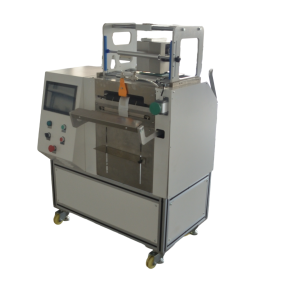
Hardware is not one material. A schedule that protects a line running zinc-plated screws will not protect a line running oily bearings or stamped brackets with burrs. Split your line by part family before you write the checklist.
Small screws and fasteners: dry, dusty, high count
Screws shed fine metal dust and plating flakes. The dust settles on the film path, the sealing jaw and the photocell. A dirty jaw leaves patchy seals. A dusty sensor misses bag edges and causes misloads. Blow off the jaw and film path with dry compressed air at low pressure every shift. Wipe the sensor lens daily. Check the bag pick-up cup for dust buildup once a week. The tabletop P350S runs 8–15 bags per minute on small parts; actual output depends on part shape and loading rhythm, and dust-related stops usually appear as short repeated pauses, not one long fault.
Bearings and oiled parts: wet film, slip risk
Oil moves from the part to the bag interior and then to the sealing jaw. Oil on the jaw weakens the seal and attracts dust. Keep oil off the film with a dedicated tray or feeder liner. Wipe the jaw with a lint-free cloth and a compatible solvent every shift. Run a peel test at the start of each run. A seal that peels cleanly without tearing the film points to oil contamination. Inspect gripper pads for oil swelling; replace them when they look glossy or lose grip.
Stamped brackets and sharp edges: abrasion and puncture
Brackets with burrs puncture the bag during loading or sealing. The damage often starts as a small stress mark on the film, not a visible hole. Hand-check a sample of parts for burrs before loading. If burrs are present, add a deburr step or specify a thicker film. Inspect the jaw protective tape or coating weekly for cuts. Check the bag opener fingers for wear, because a sharp edge there tears the bag before the part is loaded.
Maintenance interval table for hardware lines
Use this table as a starting point, then adjust after two weeks of your own production data. Intervals assume one shift; add a shift and shorten the interval where dust or oil is heavy.
| Task | Screws and fasteners | Bearings and oiled parts | Stamped brackets |
|---|---|---|---|
| Sealing jaw cleaning | Every shift, dry air | Every shift, solvent wipe | Every shift, inspect tape |
| Film path and sensor lens | Daily wipe | Daily check for oil film | Daily check for film debris |
| Gripper pad check | Weekly, dust buildup | Weekly, oil swelling | Weekly, cuts from burrs |
| Jaw protective tape | Monthly replace | Monthly replace | Weekly if burrs present |
| Trial seal on own film | Weekly | Daily | Weekly |
| Cutter blade inspection | Monthly | Monthly | Monthly, earlier if edges ragged |
Seal target is consistency: thin film must not be burnt through, thick film must not be under-sealed. Verify with a trial seal on your own film, not from a spec sheet. A mismatched ribbon is the most common cause of patchy or non-scannable codes, so check ribbon width against the printhead width and the film surface. Model-specific settings sit on the 熱転写式オーバープリンター page.
Five maintenance errors that cost hardware lines uptime
- Over-lubricating the sealing mechanism. Grease on the jaw traps dust and oil. Follow the manual’s lubrication points. A dry jaw is easier to keep clean than a greasy one.
- Using the wrong cleaning solvent. Some solvents attack the jaw coating or swell the gripper pads. Test on a spare pad before you wipe the production jaw.
- Skipping the film path after a jam. A jam leaves film fragments that cause the next jam. Inspect the full path and remove debris before restarting.
- Running one seal setting across bag sizes. Recall the stored recipe from the touchscreen; the library holds hundreds of recipes, so bag size and print content change without re-programming. Confirm with a trial seal after every changeover.
- Delaying wear-part replacement. Gripper pads, jaw tape and cutter blades wear gradually. Keep one spare set on hand and replace at the first sign of wear, not after a failure.
The machine uses a dual-zone design: a low-pressure zone prevents unexpected start-up, and a torque-limited high-pressure zone gives overload protection if the seal meets abnormal resistance. Do not bypass either zone during maintenance. Confirm both function after any work inside the guard.
Weekly and monthly checklist you can log
Assign one person per shift and log the result. A signed log turns maintenance from habit into data.
Weekly
- Inspect the sealing jaw for residue, cuts or tape wear; clean or replace.
- Check gripper pads for oil swelling, dust and cuts; wipe or replace.
- Run a trial seal on production film at the current setpoint and record the peel result.
- Clean the photocell lens and reflector with a dry, lint-free cloth.
- Inspect bag opener fingers for wear or film residue.
- Confirm the emergency stop and safety interlocks work.
Monthly
- Inspect the cutter blade; replace if bag edges are ragged.
- Check film roll brake and tension control for smooth operation.
- Clean or replace the air filter on the pneumatic circuit if fitted.
- Back up custom recipes if the controller supports export.
- Inspect cables and connectors for damage or loose connections.
- Time a changeover to a new bag size and compare against your target. On small batches, changeover downtime usually costs more than peak speed.
Keep the log per recipe, not per machine. Over a few months it shows which parts wear faster under a specific part shape and lets you set intervals from your own data. Bag cost and consumable fit belong in the same review: width, length, thickness and print of the single-side open roll film are customised to the pick mechanism and sealing parameters.
How to verify the maintenance actually works
Maintenance is effective when seal quality and uptime stay flat. Five checks are enough for most hardware lines.
- Seal peel test. Once per shift, seal a bag with a sample part and peel it. The seal should tear the film, not peel away cleanly. Record the result.
- Code readability. Scan a printed code with a handheld reader. A no-read or partial read points to ribbon or printhead issues.
- Bag opening rate. Count misopens per shift. A rising count points to worn opener fingers or a film problem.
- Downtime log by cause. If dust-related stops climb, raise cleaning frequency or add local extraction at the loading point.
- Changeover time. Time a bag size change. If it exceeds target, review the recipe library and operator training before adding hardware.
The machine sits on casters, so one operator can move it between stations. Re-check the seal after any move, because a new position changes loading rhythm and sometimes the feeder setup. If the line uses a robot arm, weigh feeder or vibratory feeder, verify the interface after maintenance and before the first production shift. For the full hardware range, see the あらかじめ開封済みのロール袋用包装機 category.
FAQ
How often should I clean the sealing jaw when running screws?
Blow it off with dry compressed air every shift and wipe it with a lint-free cloth daily. If you see dust buildup or patchy seals, move to every four hours. A trial seal after cleaning confirms the result.
Can one maintenance schedule cover oiled parts and dry parts?
No. Oiled parts need a solvent wipe of the jaw every shift and a daily seal check. Dry parts need dust removal. One shared schedule either leaves oil on a dry line or dust on an oiled line.
What causes a sudden rise in misloads on a hardware line?
Check the photocell lens first. Dust or oil film on the sensor causes missed bag edges. Then check bag opener fingers for wear and confirm film roll tension is steady. Clean the sensor and run a short test batch.
When should gripper pads be replaced?
Inspect weekly. Replace when pads look glossy from oil, hold embedded debris or show cuts. A pad that slips during pick-up is already too worn. Keep one spare set at the line.
Is a pre-opened bag packaging system for hardware suitable for small batches?
Yes, when changeover is quick. Recipes are recalled from the touchscreen, so bag size and print content change without re-programming. Small batches are usually limited by changeover and loading, not by peak speed.
Send your bag drawing and a photo of the part — we will come back with a model recommendation and a reference price band within one business day. Contact us for a quote.
Get a quote and a model recommendation
Send these four things and we can come back with a model and a reference price band in one go, instead of a week of back-and-forth:
- Bag size (width x length) or a photo of the pack you use today
- Part size, part weight, and how many pieces go into one bag
- Target output in bags per minute, and running hours per day
- Whether each bag needs a date code, batch number or QR code printed on it
We reply within 2 working hours and send a model recommendation with a reference price band within one business day. If you want to see the seal and print first, send a sample part and we will run a trial bag.