


A pre-opened roll bag packaging machine rarely fails all at once. It fails at the edges: a seal that holds on thin film but burns on thick film, a code that scans on Monday and fails on Friday, a changeover that takes 40 minutes instead of 10. Pre-opened roll bag packaging machine acceptance is therefore a question of which parameter drifts first, not whether the machine runs.
Start with the symptom. The table below maps common handover complaints to likely causes and the check that confirms each one. Specs quoted here come with conditions, and every check should be run on your own film and parts.
Symptom-to-Cause Table for Pre-Opened Roll Bag Packaging Machine Acceptance
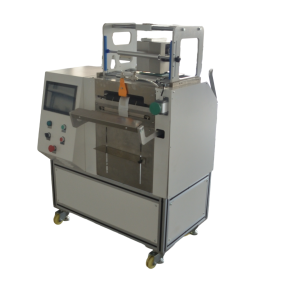
Use the symptom in your trial as the entry point. Do not adjust two parameters at once. For each row, run the check, record the result, then move to the next row only if the symptom persists.
| Symptom at handover | Likely cause | How to confirm |
|---|---|---|
| Seal peels on thin film | Seal temperature or dwell too high for film gauge | Run a seal trial at three temperatures, pull test each bag, record the lowest temperature that holds without burn-through. |
| Seal wrinkles or burns on thick film | Heat not wrapping evenly around the seal bar | Check the 360-degree wrap heating and air cooling path. Use thermal-sensitive paper to see the heat profile across the bar. |
| Bag opening fails or tears | Pre-opened side misaligned with the pick mechanism | Measure the open-side offset against the film spec. A mismatch of a few millimeters is enough to cause recurring pick errors. |
| Codes patchy or non-scannable | Ribbon width or surface not matched to printhead and film | Compare ribbon width to printhead width. Run a scan test at 100% and 80% print density on the same bag. |
| Output falls below expectation | Loading rhythm or changeover, not peak cycle rate | Time 30 bags with an operator loading, then 30 with a feeder. Record changeover time separately. |
| Variable data drifts between bags | Print timing not synchronized with bag feed | Check the servo bus synchronization. Print one code per bag for 20 bags and compare position and content. |
What the Spec Sheet Should Say Before You Sign
Most spec sheets quote a single top speed. That number is close to useless on a high-mix line. The JYZN-P350S pre-opened roll bag packaging machine runs 8–15 bags per minute, but actual output depends on part shape, loading rhythm, and whether an operator or a feeder loads the bag. Ask for the speed band with those conditions attached, and test it with your part.
Three parameters decide whether a pre-opened roll bag packaging machine fits your line:
- Seal consistency, not seal force. The target is thin film not burnt through and thick film not under-sealed. Verify with a trial seal on your own film, not from the spec sheet.
- Changeover time. A recipe library stores product recipes recalled from the touchscreen, officially hundreds of recipes. Run a changeover from your most common bag size to your second most common. Time it.
- Print area coverage. TTO print areas of 53×55 mm, 55×115 mm, and 107×115 mm are available across the model range. The 107×115 mm head covers larger label content in one pass. Check that your largest code fits without reducing density.
For bagging and coding in one machine, the print step is built into the bagger. That removes the separate labeling step but adds a printing variable to the acceptance test. Treat print quality and seal quality as two separate acceptance items.
Exclusion Sequence: From Film to Printhead
Work outward from the consumable. Film and ribbon cause more handover issues than the machine itself, and they are cheaper to check first.
- Film fit. Single-side open roll film is pre-opened on one side and perforated on the other. Width, length, thickness, and print are customized to the pick mechanism and sealing parameters. Confirm that the delivered roll matches the film drawing, not just the product name.
- Ribbon fit. Thermal transfer ribbon must match the printhead width and the film surface. A mismatched ribbon is the most common cause of patchy or non-scannable codes. Check ribbon width against printhead width before touching print settings.
- Seal parameters. Servo torque sealing with 360-degree wrap heating and air cooling, synchronized by a multi-axis servo bus for bag feed, sealing, and print timing. If the seal fails after film and ribbon are confirmed, re-run the seal trial at three temperatures.
- Recipe recall. Confirm that the touchscreen recalls the correct bag size and print content. A wrong recipe can look like a mechanical fault.
- Safety zones. The dual-zone design uses a low-pressure zone to prevent unexpected start-up and a torque-limited high-pressure zone for overload protection if the seal meets abnormal resistance. If the machine stops mid-cycle, check whether the high-pressure zone tripped before adjusting anything.
If the machine is moved between stations on casters, re-check the film path after each move. Casters make the machine flexible but also make alignment drift possible.
Disposition and Retest: Building the Record
Every adjustment needs a retest that can be repeated by the next shift. Write the test down.
For seal quality, seal five bags at the chosen setting and pull test each one. Record film gauge, temperature, dwell, and result. For print quality, print 20 consecutive bags with variable data and scan each code. Record print density and scan pass rate. For changeover, time the change from bag size A to bag size B, including recipe recall and first-article check.
Keep a reference bag from the accepted run. It is the fastest way to detect drift later. If your line includes a thermal transfer overprinter as a separate unit, run the same scan test and keep the same record.
For high-mix lines, the acceptance criterion is not peak speed. On small batches, changeover downtime usually costs more than peak speed. Evaluate changeover time, bag cost, and consumable fit together.
Preventing Recurrence on the Line
Most repeat faults come from consumable substitution. A new film roll with a different thickness, or a ribbon from a different lot, can shift the seal and print window. Lock the consumable spec and re-run the seal trial whenever the film supplier or gauge changes.
Set a daily check that takes under five minutes:
- Pull test one bag from the first run of the shift.
- Scan one printed code.
- Confirm the recipe name on the touchscreen matches the bag size loaded.
For integration work, the machine can be interfaced with robot arms, weigh feeders, vibratory feeders, and MES/ERP systems. Add a handshake check after any integration change. A feeder timing change can look like a bagger fault.
Applications such as sensors, electronic components, automotive parts, hardware and fasteners, medical kits, and appliance accessories all use lightweight, high-variety parts. The bagging and coding in one machine setup reduces the separate labeling or label-printing step, but it also means a print fault stops the bagger. Keep a spare ribbon matched to the printhead width on the line.
FAQ
Q: The spec says 15 bags per minute. Why does my line run slower?
A: That figure assumes favorable part shape and loading rhythm. With manual loading, output is usually limited by the operator, not the machine. Time 30 bags with your own parts before comparing.
Q: Can I use any ribbon on this pre-opened roll bag packaging machine?
A: No. Ribbon must match the printhead width and the film surface. A mismatched ribbon is the most common cause of patchy or non-scannable codes. Check width and surface before adjusting print settings.
Q: How do I know the seal is set correctly?
A: Run a trial seal on your own film at three temperatures and pull test each bag. Thin film must not be burnt through; thick film must not be under-sealed. Do not rely on the spec sheet alone.
Q: What should I time during acceptance?
A: Changeover from your most common bag size to your second most common, including recipe recall and first-article check. On small batches, that number matters more than peak cycle rate.
Q: Do I need a separate printer?
A: Printing is built into the bagger on the JYZN setup, so variable data is produced on demand, one code per bag. If you already run a separate TTO, test both paths with the same scan criteria.
Send your bag drawing and a photo of the part — we will come back with a model recommendation and a reference price band within one business day. Contact us for a quote.
Get a quote and a model recommendation
Send these four things and we can come back with a model and a reference price band in one go, instead of a week of back-and-forth:
- Bag size (width x length) or a photo of the pack you use today
- Part size, part weight, and how many pieces go into one bag
- Target output in bags per minute, and running hours per day
- Whether each bag needs a date code, batch number or QR code printed on it
We reply within 2 working hours and send a model recommendation with a reference price band within one business day. If you want to see the seal and print first, send a sample part and we will run a trial bag.