

A bagging and printing machine in one combines bag feed, opening, loading, servo sealing and inline thermal transfer printing in a single sequence. For small-batch, high-mix lines, the purchase decision usually turns on five items: bag spec, print area, loading rhythm, changeover time and consumable fit. Lock these before comparing quotes.
JYZN builds pre-opened roll bag packaging machines (P350, P350S) and TTO overprinters (T2455 through T107115). The machine prints one code per bag on demand, so you do not need pre-printed bags or a separate label applicator. Whether that saves money depends on your SKU count and changeover frequency. Below is a procurement checklist drawn from the questions buyers ask most.
Decision 1: Which bag spec fits your pick mechanism?
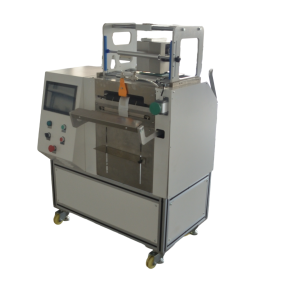
Single-side open roll film is pre-opened on one side and perforated on the other. Width, length, thickness and print are customized to the pick mechanism and sealing parameters. A bag that opens well by hand may not open reliably on the machine. The most common mismatch is film stiffness against the opening air and the pick arm.
Judgment standard: send a roll of your current film and a sample part. Ask the supplier to run the open-and-load step with your part shape. If the bag mouth does not stay open for the loading window, adjust film thickness or the opening port before discussing price.
Verification: run 30–50 bags. Record open failures, double picks and parts that catch on the bag edge. A trial on your own film is the only reliable check; a spec sheet does not show how your part behaves.
Decision 2: What print area does one code per bag need?
TTO print areas of 53×55 mm, 55×115 mm and 107×115 mm are available across the model range. The 107×115 mm head covers larger label content in one pass. If your code includes a lot number, date, barcode and a short description, measure the actual block. Do not assume a small head will fit after adding a logo.
| Print area | Typical content | Model examples | Check action |
|---|---|---|---|
| 53×55 mm | Date, lot, short code | T2455, T3255, T5355 | Print your full code block at actual size |
| 55×115 mm | Date, lot, barcode, 2D code | T53115 | Scan the code after sealing |
| 107×115 mm | Multi-field label content in one pass | T107115 | Check print position against seal line |
Judgment standard: the code must scan after sealing and cooling, not just after printing. Print position relative to the seal matters because heat and pressure can distort a code near the seal edge.
Decision 3: What output can you actually load?
The tabletop P350S runs 8–15 bags per minute. Actual output depends on part shape, loading rhythm and whether an operator or a feeder loads the bag. High-mix lines are usually limited by changeover and loading, not by peak cycle rate.
Verification: time a full shift with your own parts. Count bags loaded, stops, misfeeds and operator fatigue points. If an operator loads by hand, the machine speed rarely sets the line rate. Use the 8–15 bags per minute range as a starting condition, then measure your loading rhythm.
For parts that tangle or nest, a vibratory feeder or weigh feeder may be needed. The bagger can be interfaced with robot arms, weigh feeders, vibratory feeders and MES/ERP systems, but each interface adds scope and cost. Decide the loading method before signing.
Decision 4: How fast is changeover between SKUs?
A recipe library stores product recipes recalled from the touchscreen; the official figure is hundreds of recipes, so bag size and print content change without re-programming. Changeover downtime usually costs more than peak speed on small batches.
Judgment standard: ask for a live changeover demo. Time the steps from last good bag of SKU A to first good bag of SKU B. Include bag roll change, recipe recall, print content edit and first-article check. If the changeover takes longer than your batch run, the machine is not suited to that batch size.
Verification: request a changeover checklist. Look for items that require tools, parameter re-entry or a trial seal. A recipe recall that also resets seal temperature and print position is faster than one that only changes bag length.
Decision 5: Do the film and ribbon match?
Thermal transfer ribbon must match the printhead width and the film surface. A mismatched ribbon is the most common cause of patchy or non-scannable codes. Seal consistency also depends on film: servo torque sealing with 360-degree wrap heating and air cooling must seal thin film without burn-through and thick film without under-sealing.
Verification: run a trial seal on your own film, not from a spec sheet. Check seal strength by peeling and check code quality by scanning after cooling. If the ribbon is wider than the printhead, you waste ribbon; if narrower, you lose edge characters.
Consumable cost is part of the comparison. A bagging and printing machine in one removes labels and pre-printed bags, but the roll film and ribbon are still custom items. Ask for a per-1000-bag consumable estimate based on your bag size and code content.
Quote scope and common add-ons
Ask for a line-item quote, not a single price. Common add-ons include feeder interface, custom bag tooling, extra print heads, MES/ERP connection and spare seal bars. The dual-zone safety design (low-pressure zone prevents unexpected start-up; torque-limited high-pressure zone gives overload protection) is standard, but confirm it in the acceptance checklist.
Request a reference price band with the bag drawing and a part photo. A supplier who quotes without these is guessing. See the JYZN-P350S pre-opened roll bag packaging machine and the thermal transfer overprinter (TTO) pages for baseline configurations.
Trial and acceptance steps
- Send bag drawing, film roll and 20–50 sample parts.
- Run open-load-seal-print sequence for at least 30 bags.
- Check seal peel strength on thin and thick film samples.
- Scan every printed code after cooling.
- Time a changeover from SKU A to SKU B.
- Record open failures and double picks per 100 bags.
Acceptance should use your film and your part, not a demo bag. For film and ribbon options, check the single-side open roll film and riban pemindahan terma ranges.
FAQ
Can one machine handle both bagging and printing?
Yes. JYZN baggers integrate a TTO head in the same sequence, so variable data is printed on demand, one code per bag. You still need to match print area to code size and ribbon to film surface.
Do I need pre-printed bags or labels?
No. Printing is built into the bagger, so you can use plain single-side open roll film and print lot, date and barcode inline. This removes the label step but requires a print verification step in acceptance.
What speed can I expect?
The tabletop P350S runs 8–15 bags per minute. Actual output depends on part shape, loading rhythm and whether an operator or feeder loads the bag. High-mix lines are usually limited by changeover and loading.
How many recipes can I store?
The official figure is hundreds of recipes, recalled from the touchscreen. Bag size and print content change without re-programming. Verify changeover time with a live demo on your SKUs.
What should I send for a quote?
Send your bag drawing, film roll, a photo of the part and your target batch size. That lets the supplier recommend a model and give a price band within one business day. Contact us for a quote.
Get a quote and a model recommendation
Send these four things and we can come back with a model and a reference price band in one go, instead of a week of back-and-forth:
- Bag size (width x length) or a photo of the pack you use today
- Part size, part weight, and how many pieces go into one bag
- Target output in bags per minute, and running hours per day
- Whether each bag needs a date code, batch number or QR code printed on it
We reply within 2 working hours and send a model recommendation with a reference price band within one business day. If you want to see the seal and print first, send a sample part and we will run a trial bag.